
The EDI Portal: every transaction, visible.
Real-time visibility and management of your EDI transactions — view, track, search, and read every document your business trades, without asking anyone to pull a report.
- Real-time transaction visibility
- Full-text search
- AI document beautification
Why Comparatio?
Real-Time Data Access: Provides immediate access to transaction data and documents in near real-time, enabling faster decision-making and response to customer needs.
Enhanced Visibility: Offers comprehensive visibility into EDI transactions across the supply chain, allowing for better tracking of document exchanges, such as purchase orders and invoices.
Scalability and Flexibility: Easily scales to meet changing business needs, supporting growth without the need for significant additional investments in infrastructure.
User-Friendly Interface: Features an intuitive, easy-to-use interface that requires minimal training, making it accessible to users of all skill levels.
Search and Export: Find transactions by item ID, ship-to and more, and export the data behind them, so your team can check what was sent and received without asking anyone for a report.
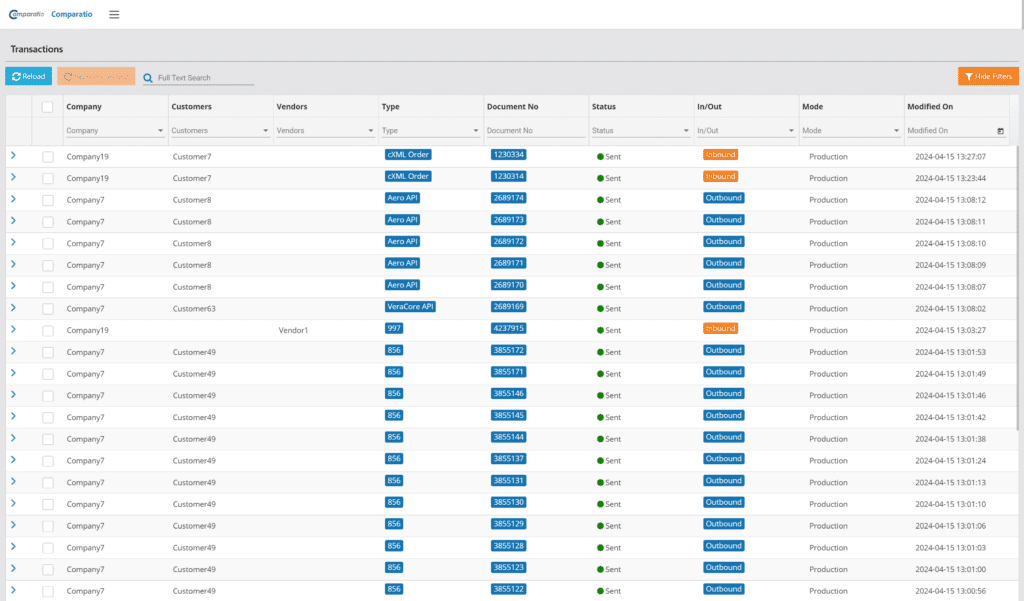
Inside the EDI Portal
AI Document Beautification: A three-pane view — your transaction list, the raw X12, and a human-readable AI-rendered version side by side, so anyone on your team can read any document.
Full-Text Search: Search across all transactions by item ID, ship-to, and more — find the document, not just the date range it might be in.
Multi-Company Display: Running multiple companies or entities? The Portal keeps each one’s activity visible on its own.
Raw Transaction Data Export: Export the raw transaction data behind any document when your team needs to dig in.
In-Portal Email Viewing: Email-based EDI traffic is viewable right in the Portal — no forwarding chains to reconstruct.
Inventory Controls: Zero-out inventory controls and per-trading-partner inventory schedules, managed from the same place you watch your transactions.
FAQ
EDI Portal, in practice
Can a user view transactions without being able to resend them?
Yes. Read-only users get the Guest role: they can look up transactions but not resend them. Tell us who needs access, and we add the users you name.
Where do we find our data exports?
In the export queue, under your profile menu. It depends on a permission on your user; if you don’t see it, ask us to turn it on.
See the EDI Portal on your own transactions.
A live look at your documents — transaction list, raw X12, and a readable version, side by side — with search that finds the document, not just the date range.